What is a network card?
The network card is one of the important hardware components of computers, and having basic information about what a network card is and what its uses can be very useful. In this section, you will find zero to one hundred required information about the network and its types. Follow us until the end.
What is a network card?
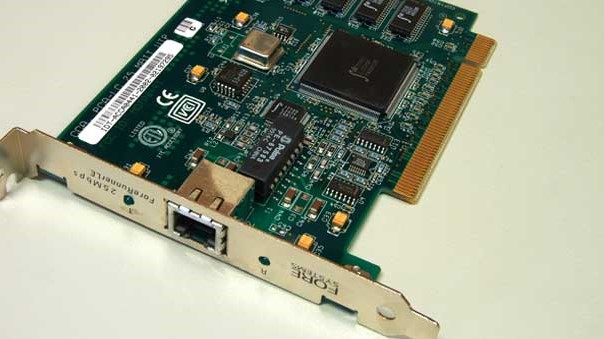
A network card is an important hardware equipment that is necessary in the process of implementing a computer network. All networked computers must have a network card to provide communication between the computer and the transmission medium such as optical fiber or copper cable. In simple terms, the network card is actually an interface between the network and the computer, which provides the possibility of communicating with all kinds of networks such as cable network, Ethernet network, wireless network, Wi-Fi network.
Network card is also known as Network Adapter, Network Card and NIC.
Fortunately, most computers now have built-in network cards, that is, the motherboards used in them have an onboard network interface, and there is no need to install a network card when connecting to the network.
Network card functions
Establishing the necessary communication between the computer and the transmission environment
The network card provides the possibility of connecting a device with another device or connects the device to the central network.
Note that a network card alone is not enough to communicate between different devices, and for example, if your computer is supposed to be a member of a large network and you intend to connect to the Internet, here we also need a router so that the device can Connect to the router through the network card and finally connect to the Internet.
Data conversion
The data is moving serially on the computer BUS and in parallel mode, and meanwhile the network card transceiver changes the data from serial to parallel mode and vice versa.
Providing a unique hardware address:
The MAC address, which is actually a sub-layer of the Link layer of the OSI reference model, is its hardware address inside the ROM chip on the network card. This hardware address is unique and distinguishes the computers of a network from each other.
Protocols such as TCP/IP use a logical address (IP), which is translated into a hardware address before the computer receives data.
Features of a powerful network card
In this section, we are going to examine the parameters that make the network card of good quality. When your system is equipped with a powerful network card, the Internet connection speed will be greatly enhanced, your communication will be very safe and reliable, and diverse and extensive data will be able to be shared by users. In addition, there are various peripheral devices that can be connected to the network card.
1) compatibility with the architecture used in the network:
Now the most common network architecture is related to the Ethernet network, which is used in large and small dimensions.
2) Appropriate speed
If a high-speed Ethernet network (100Mbps) is used, it is certainly a mistake to choose an Ethernet card with a speed of 10Mbps. Fortunately, most new network cards have the ability to switch between 10 and 100 Mbps speeds.
3) compatibility with the type of empty motherboard slots:
According to the different types of motherboard slots, there are also different types of network cards. For example, ISA cards are installed in ISA slots, and PCI cards are installed in empty PCI slots. Basically, the network card should be selected based on the empty slots on the motherboard, and the free slot also depends on the motherboard model, which has types such as ISA, PCI and EISA.
Familiarity with PCI and ISA
The standard used in ISA computers is IBM XT. In the beginning, this standard was eight-bit, and in 1984, its 16-bit version entered the market. In this standard, a large amount of hardware equipment such as sound cards, modems, network cards, etc. has been produced and supplied. Currently, some motherboards have PCI slots and support ISA cards.
PCI is a standard that was introduced in 1993 and due to its potential, its speed is higher than ISA. This bus is 32-bit and supports 64-bit.
4) Buffering:
The buffer is actually the same RAM or chip memory that is located on the network card. A buffer is used to hold data waiting to be processed or waiting to be published.
5) DMA
Computers that support DMA can send and receive data from memory directly without using a processor.
6) Bus Mastering
Some network cards with their special design can access the RAM memory without any intermediary (computer processor) and in this way they control the bus and send or receive data through the computer RAM.